Lighting to HDMI Cable Adapter for IOS/Android, Weton HD 1080P Video Lightning Digital AV Cable AirPlay HDTV Adapter MHL to HDMI Video Adapter for iphone X 8 plus Samsung to TV/Projector/Monitor
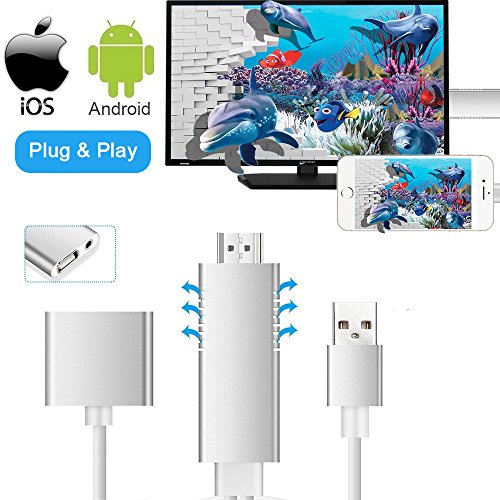
Weton 2018 New Updated Full HD 1080P Lightning to HDMI Adapter for IOS & Android Updated Features: Compatible with both IOS & Android Smartphones (( IOS8.0 and Above; Android 5.0 and Above) Full 1080p HD to Mirror your favorite mobile movies/games and more from iPhone/ iPad/ Android to big screen. Add cooling vents to make
Weton 2018 New Updated Full HD 1080P Lightning to HDMI Adapter for IOS & Android
Updated Features:
Compatible with both IOS & Android Smartphones (( IOS8.0 and Above; Android 5.0 and Above)
Full 1080p HD to Mirror your favorite mobile movies/games and more from iPhone/ iPad/ Android to big screen.
Add cooling vents to make it to loose heat in a better way which to avoid damage your devices by high temperature.
Q:How to connect for IOS system?
A: Plug and Play, Easy to use !
1. Connect to TV or projector which come with HDMI ports via lightning digital AV adapter
2. Plug lightning to HDMI cable to your iPhone or iPad
3. Plug USB to power adapter or outlet (5V/1A for iPhone, 5V/2A+ for iPad)
4.Click “trust” on your iphone and it will sync successfully a few seconds later
Q:How to connect for Android system?
A: Please make sure you have installed “EZCast” application successfully before using this screen mirroring.
1.Download the Ezcast APP on Android Market
2.Insert the USB port to the USB adapter or interface
3.Connect to TV or projector via HDMI port
4.Switch the TV/projector’s output to corresponding HDMI.
5.Insert the original phone USB cable into USB female port of cable.
Warm Tips:
1. Please make sure of right adapter(5V/1A),5W for iPhone. Original adapters are the best choices
2. Due to copyright protection measure, NOT support paid Apps including Netflix, Amazon Prime videos, Hulu, Comcast tv, Xfinity, Vudu, DIRECTV etc. Please refer to the terms and conditions of those apps.
3. About iTunes, it only works with home videos and doesn’t work with licensed movies.
Specifications:
App: Powered by EZcast
Compatible OS: Android 5.0+/ IOS 8.0+
CPU (MHz): 600 MHz
RAM(MB): DDR3 128MByte
Max Resolution: 1920 * 1080P
Power: DC 5V 1A
Product Features
- ◆Plug and Play — For IOS,Without Any Driver/ Software/ APP needed. No Need Personal Hotspot/Airplay/ WiFi/Bluetooth. Ezcast APP is required for Android system. Enjoy to sync cast your iPhone/ iPad/ Android screen to big TV screen, just insert each interface to corresponding device, wait a few seconds and it will be connected automatically.
- ◆Full 1080p HD Display — The HDMI cable supports 1080P high digital signal output, can be connected to HDMI Monitors, HD-TVs. This MHL adapter supports video callings from FaceTime, Skype, WhatsApp; Supports streaming videos, pictures, games, slideshows on Facebook, YouTube, Instagram, Twitter, Reddit, Pinterest, Snapchat, IDMB, Microsoft Office, etc.
- ◆Screen Mirroring Cable — MHL Adapter Enables you to mirror your mobile device’s content to your TV screen ( including movies, TV show, music, video, audio, photo and more). It supports mirroring of what is displayed on your device screen – including apps, presentations, websites, slideshows and more to your HDMI-equipped TV, display, projector or other compatible display in up to 1080p HD.
- ◆Apps Supported — YouTube, Hulu Plus, IDMB, Quickflix, Family On TV, ABC, NBC, FOX, Microsoft Office and more videos downloaded and saved on your IOS and Samsung Devices for stream. Not Compatible with Apps which have “HDCP” video copyrights protection like Netflix, iTunes movies, Amazon video, HBO go, HULU and Honda motor.
- ◆Wide Compatibility — Lightning to HDMI cable compatible with ALL IOS Apple iphone ( including iOS 11) and Android devices (Android 5.0 and Above). Compatible with All of the over IOS 8.0 iPhone & iPad. Including iPhone X/ 8 / 8 Plus/ 7 / 7 Plus / 6s / 6s Plus / 6 / 6 Plus / 5s / 5 / iPad Pro / iPad Air 2 / iPad mini 4 / iPod Touch(5th & 6th Generation).
Comments